Pinterest Strategy That Actually Makes You Successful
If you’re looking for a Pinterest strategy that works in 2021 – you’ve just found it.
Without unnecessary fluff (this post will be anyway too long) here are a few important points before I get into the details of my Pinterest strategy in 2021.
I would like to be completely honest with you, so in this post, you will see my Google Analytics screenshots and screenshots from my Pinterest account.
But here are a few things I believe are essential to start with:
- This is something that works for me, and there’s no guarantee it will work for you as well. The factors are many. However, I know that many other bloggers do things similar to mine, and it works for them too.
- You might need to tweak some of the ideas to fit your schedule and way of work.
- Even if you follow everything I do, the results will be different. I’ve got two blogs, and they perform differently. It depends on how long you’ve been blogging, how strong your account is on Pinterest and how you will use my tips to fit your business/niche.
- The number of followers you have on Pinterest doesn’t increase or decrease the number of page views on your blog. That was something that didn’t matter in 2020 and it still doesn’t matter in 2021.
- I’ve been blogging for over four years. I’ve got two blogs. The numbers we discuss here are regarding my first blog, and I don’t include anything from this blog. You can check my blogging secrets here.
- It’s a niche that’s really hard to work with, and it’s not one of the popular niches on Pinterest – I blog about Relationships.
- I did an experiment in March 2021 that cost me a huge drop in traffic.
- Also, Pinterest is getting harder and harder to please. I am scaling my strategy with Google and I intend on reducing my time on Pinterest as soon as I get the same traffic from Google. I will explain why in a different subheading at the end of the post (just in case you don’t care at all, I don’t want to bother you with unnecessary information)
How To Create 6 Pins in 10 Minutes or Less
At the end of the post, I will give you two videos. One of them will show you how I created the top three pins for this post. It took me a while as I wasn’t sure what I am going after.
The second video will show you how I created 6 pins in 10 minutes, but they can be done in less time for sure.
I hope these videos will give you an idea of the importance of having a vision for your brand. It might also give you some tricks on minimizing the time you spend creating social media content.
Disclosure: This post contains affiliate links, which means that if you sign up or make a purchase I might get a small commission at no extra cost to you. Thank you for supporting my business. See full disclosure.
Is Pinterest Still Relevant in 2021?
Here is some statistic from my Pinterest account from the last 30 days.

Yes, Pinterest is still relevant.
However, it gets harder and harder to play the Pinterest game and stay on top of things. They made some serious updates lately that completely changed the way we all used to pin.
With over 450 Million users, Pinterest is a platform you need to be on if you’d want to attract people.
It’s still the fastest way to get traffic to your blog, but you need to learn to play the game properly.
There are a few key points you must be aware of, and you need to be able to give it time.
A sidenote
I strongly stay behind my position that Pinterest is relevant and still worth the time in 2021. Probably that’s because it still drives a lot of traffic to my blogs. However…
Pinterest has been getting on my nerves lately, and I am saying this knowing how childish it sounds. Yet, it’s true. It’s really hard to spend hours every week to work building a presence just to see your pins stolen over and over again… and getting higher ranking positions (with your image and your text). I’ve reported a specific account that steals pins from many bloggers at least three times. That account is still active and growing through others’ work.
I also have a theory that Pinterest has been intentionally shadowing accounts in order to keep traffic to a certain number. I’m still gathering proof of that for both of my accounts. Post on this is coming soon.
Important changes Pinterest did in 2020 that are relevant in 2021
1. More fresh content
I think that that’s the most confusing part of all.
The guys from Pinterest advise us that we upload more and more fresh content to the platform.
Fresh content means new pins. Every new pin should be with a new image, but if we use the same image, we must change fonts, colors, zoom in or zoom out the photo, and change the title. I mainly use new photos for every pin.
2. Less re-pinning
This goes for re-pinning our content or others’ content. Pinterest wants us to focus on producing fresh new pins and not re-pinning our content too much. It’s the users that will re-pin our content to their personal boards.
When it comes to other people’s content, the idea is the same. However, if you’re with a new account, I would re-pin other people’s strong pins to my relevant boards until I pile up some content of mine.
3. Story Pins
This is a feature Pinterest introduced slowly in the past year or so. Now, they push it forward so hard that everybody feels obligated to try them. I advise you not to.
Story pins don’t give you the option to add a link to your blog, so they won’t bring much (if any) traffic. Some people say that story pins drive attention to your profile, and people could visit your blog from there. However, how many times did you get so impressed by someone’s story pin that you went hunting their blog as a user? Exactly!
It happens rarely, and the work you would put in creating 10 images, descriptions and uploading it to Pinterest just doesn’t pay off in any way. I am on Pinterest to drive traffic to my blog so that I can monetize it. If people cannot come to my blog through a feature, I save my time and do something more rewarding with it.
4. Product Tagging
Pinterest has pushed forward product tagging, and at the beginning of the year, they transformed basically most of the pins on the platform into shopping pins. That caused a huge disruption in the blogging world, resulting in this post by Kyla. Long story short, Pinterest fixed the issue by allowing bloggers to opt-out of it.
What didn’t make any sense was that both my blogs were affected, and I sell relationship and personal growth tips, not actual items. Yet, Pinterest decided that a free stock photo of a couple in love deserves to be dotted all over the place with offers for shirts and trousers.
That’s gone now, all is fixed and we are (not) ready to see what’s next.
You can, however, still tag products on your pins and connect your own shop to Pinterest. Some bloggers believe this is the future of Pinterest. We shall see.
How do I use Pinterest for Business in 2020? My Pinterest Strategy
The part you probably care the most about is coming. Keep in mind that this Pinterest strategy works for me. Take it, tweak it, adapt things to your needs. And share the results.
Let’s start!
1. Keywords
In the last three years, Pinterest has been following the same trend – improving keywords and the way people get fresh ideas.
Having a well-keyworded account must be your priority number one.
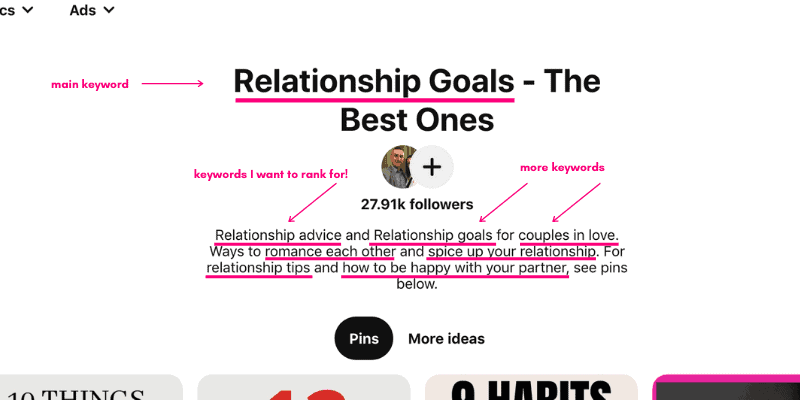
I work with keywords on a few levels before I even start pinning any pins.
- In my Display name
- In my About section
- As board names – My main keywords and website categories exist as boards as well.
- In every board description – that’s a huge way to tell Pinterest what this board is about before you even pin your first pin.
⇓see screenshots below⇓

How to find keywords to rank for in Pinterest?
The screenshots below are taken in 2020. However, the strategy is still relevant.
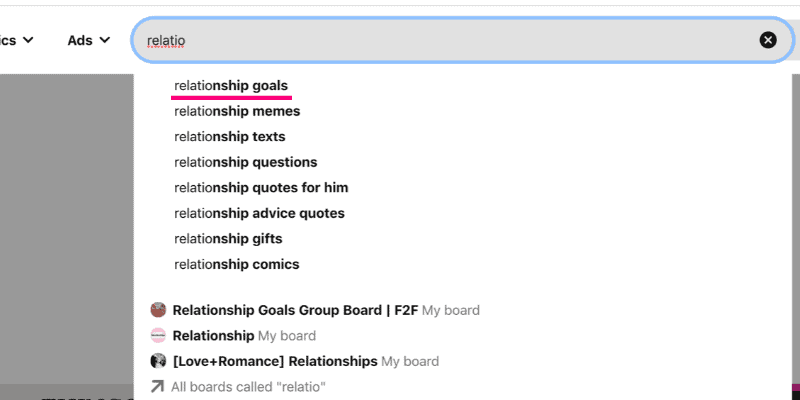
I’ve got a few ways to check if a keyword is good on Pinterest.
1. When I start typing it, and I see it as a suggestion in the drop-down. See photo below⇓
2. If it exists in topics.⇓
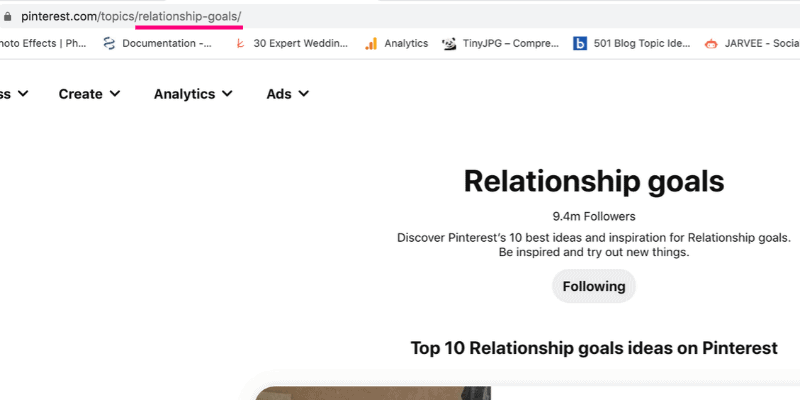
4. If it’s a keyword, I would like to rank for on Google even if it doesn’t have a too big following on Pinterest.
Yes, Pinterest helps you with Google too. The chances are that your best posts on Pinterest will rank quite well on Google also. Very often if people search for a keyword on Google, they will see suggestions from Pinterest. That’s a good indication that Pinterest and Google have established communication and transfer link juices to one another.
Keywords when pinning
It’s really simple actually. When I pin a new pin, I place the keyword in three places:
- Before uploading the pin: I change the name of the image to be the keyword I want to rank for;
- In the pin image – Pinterest can read the text on your pin image;
- In the title – I change the titles of the pins every time;
- In the pin description;
Combine that with the right board that matches the category of the keyword, and it’s a strong combination that will give results.
Fewer Pinterest Boards for my Pinterest Strategy
Okay, back in the days it was alright to have hundreds of boards.
Last year, I used fewer boards and saw better results.
This year things are a bit different. I’ve noticed that if I keep pinning to a board it keeps it active and the other pins on the board start to perform better too. This was something I experimented with in March this year. I dropped the number of boards I was using and my traffic went down significantly. That strategy was in combination with something else, so the drop didn’t come from the boards only.
However, since I started using most of my boards (to keep them active in the eyes of Pinterest) traffic is slowly climbing back up.
Group Boards are useless (to me)
Now is the time to remind you that this Pinterest strategy for 2021 is about what works for me.
Group boards don’t work for me. I know many other bloggers say the same.
Group boards used to be a great way to attract new eyeballs on our pins, but Pinterest has grown to ignore them simply because bloggers started mistreating the idea of using them. When a board has over 100 contributions, it usually comes with a low re-pinning rate. I am still part of many group boards I joined years ago, but I don’t pin to them anymore. I will probably leave them soon, just not sure when.
Long pins
We all know that Pinterest’s ratio is 2:3, but that number has never worked for me, and I see many other bloggers who struggle with Pinterest traffic use the same ratio.
I use a combination of 3-4 different sizes and some of them are 2:3 ratio.
My Pinterest dimensions are:
- 600×1200 – long pins with a ratio of 1:2. Pinterest doesn’t cut them, and it’s clearly happy with it.
- 1000 x 1500 – I think that was the official ratio Pinterest suggests we use, so that’s what I do.
- 1000 x 1800 – I like long pins and I believe long pins still outperform 2:3, so I use this ratio to stay in Pinterest’s guidelines.
Whatever your size is, make sure it’s long enough to be seen, but not too long, so Pinterest cuts it.
Pin Design for the best Pinterest traffic
I follow these simple rules:
- My image shouldn’t take more than 40-50% of the space on the pin.
- That means that the rest 50-60% of my pin I use to add text.
- My design is always similar to my other pins. I strongly believe that Pinterest recognizes if a design doesn’t match your established brand/pin design and doesn’t “show it” properly to viewers. I’ve experimented with many other designs, but the pins that perform the best are the ones that match my design. This means that I’m comfortable showing you my design because I know the chances are it won’t work for you exactly the same way. You need to find your own style and stick to it.
- I try to keep the text as short as possible, so it’s easy to read when scrolling on the phone.
- I use big letters and easy-to-read fonts – remember, even if you work on a big desktop, over 85% of the users browse through their phones. You need to grab their attention instantly.
- I usually try to keep the look minimalistic and straightforward if possible, but sometimes I go overboard. However, I’ve noticed that cluttered pins don’t get too many clicks.
- Bright, easy to see objects on the photo, understandable message – all that matters.
- The photo should represent your keyword, and the photo itself should have as less unnecessary stuff as possible. You are fighting for ranking with a certain keyword, make sure Pinterest doesn’t misunderstand you.
Bonus Tip: Always brand your pins with your logo or blog name. In this way, it will be easier to claim it if it gets stolen.
Now, remember the crazy numbers from my four pins above? See below some full pins and notice that they cover the points I just listed.
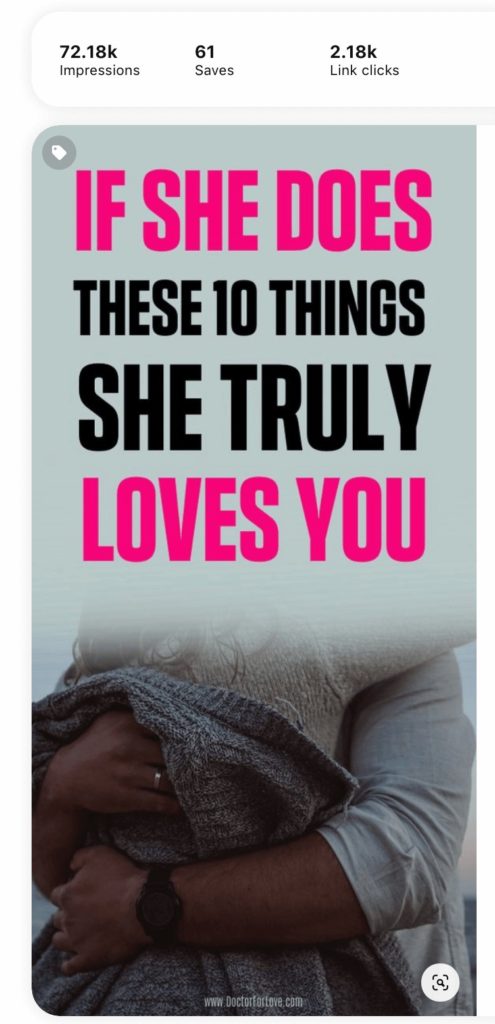
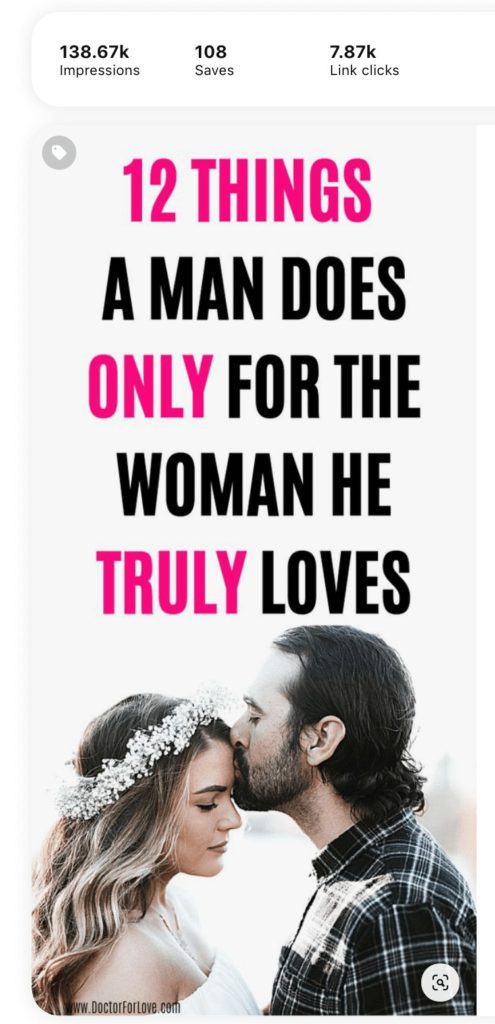

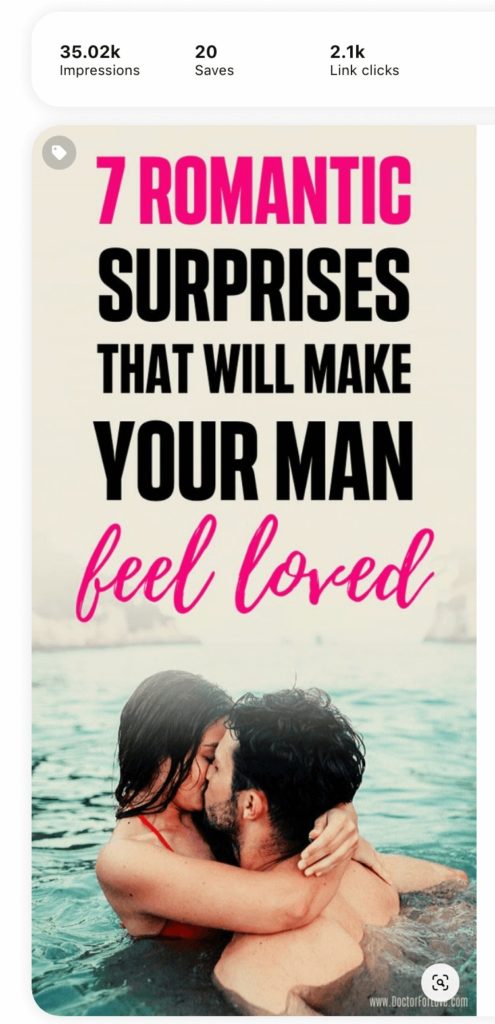
Did you notice?
If you saw the pins and read the captions, you might have noticed – they are old pins.
I’ve got new pins that perform okay, but the majority of my strong pins right now are over a year old. This leads me to my next secret from my Pinterest strategy.
Consistency and time
If you read my other blog post on the five most important things to focus on as a new blogger you know that there’s one tip I believe makes the difference between a successful and unsuccessful blogger (with small exceptions, of course).
It’s Time!
Give it time.
As I like to say, we live in an “instant world”. Everything we want or everything we might think we want could be ours in a matter of a few clicks, quick call, online order and so on.
We aren’t used to waiting patiently.
In fact, patience isn’t humanity’s strongest characteristic, and that’s okay sometimes.
But most of the times is what bring us down and causes disappointment.
If there’s one thing I’ve learned with Pinterest over the years, it’s that whatever I do, I must give it time, and I must be patient to see proper results. Now, the pins from above are my strongest pins since the moment I pinned them over a year ago.
But my new pins don’t perform that well. And that’s okay too. I know it’s just a matter of time to spike up and I’m willing to give it that time. Meanwhile, I focus on consistency.
Pinterest rewards you when you show up every day on the platform. I pin most of my pins manually; I also use Pinterest’s scheduler. Most of the days, if I’m home, I will do things manually, even if that means that my evenings suffer a bit (I live in Europe and target the US traffic).
Repinning the same pin

I do not re-pin pins anymore. Sometimes, I save other bloggers’ pins to my boards.
Re-pinning was a huge thing of my strategy at the beginning of last year. It was okay to re-pin a pin as long as it doesn’t go to the same board.
Yet, I’m very skeptical about this as Pinterest keeps saying that they want new ideas and new, more engaging ways to present old ideas. That tells me that re-pinning the same pin repeatedly isn’t following their guidelines and might be seen as a spammy technique (I am not saying it is).
I know bloggers who re-pin their pins 7 or 10 days after the first upload. I do not have the time to track when I’ve pinned a pin and if I’ve already re-pinned it once. Therefore, I am not doing it at all.
Change Titles
I feel like this one should be a no-brainer, but I’ll include it here anyway.
I try to tweak and experiment with my titles as much as possible. I am fighting for the attention of many different people, and each one of them gets triggered by a different thing.
Sometimes I have to work with their dreams, goals, fears, desires. No, that’s not manipulation, that’s marketing (but yeah, it is kind of manipulation…).
Experiment

Experiment. Experiment. Experiment.
This part isn’t something that makes you feel comfortable if you aren’t a risk-taker.
I’m not a risk-taker.
Yet, with blogging, you need to know that you either experiment or you never learn and… you never grow.
Here are a few things I experiment with all the time:
- Titles;
- Pin descriptions;
- Pin colours;
- Time to pin;
- How many pins to pin;
- Which board to pin a certain keyword on;
- Everything that can be tweaked – I will eventually experiment with it.
Experimenting got me to over 200K page views. It will help you too.
Important resources for Pinterest

Pinterest Course
I am a huge fan of Carly from Mommy on Purpose. I took her course Pinteresting Strategies over two years ago, and it was packed with lots of useful tips. She updates it all the time. If you’re looking for in-depth information on how Pinterest works, I strongly suggest you take a look at it. She also has a mastermind group you could join for a monthly fee.
Let me place a disclaimer, that I haven’t mentioned any of the specific tips that work for her as I wouldn’t want to violate her copyrights. If you are curious to see what she offers you could take a look at her course by clicking here.
Canva for pin creation
All of my pins are created in Canva. I signed up for the Pro version so I could have access to the photos, but all other elements from my pin designs are available in the free version too.
You could sign up for Canva here.
I’ve recorded a video on how I create a few pins for this post, plus a video pin you can watch it below.
See the next video for how I created 6 pins in 10 minutes, but I could easily do it for less. I didn’t move too fast with the mouse so you could clearly see what I’m doing.
The Pinterest mistake I did that ruined my traffic.
I said “Experiment!” above, didn’t I? And that’s what I do all the time. Yet, one of my experiments didn’t work out too well and it caused me a massive traffic drop in March and April. Now I am on the way back up, but it definitely takes longer than usual to get my traffic high.
I heard that some bloggers have very good results with pinning less than usual. They would pin just a pin or two a day and even skip days. They would also pin just to a few boards and that would make the traffic spike even more.
So, I did that in March. At first, my traffic spiked up… for a few days. Then, it started fluctuating for a week or so. After that, it started dropping… so bad that it kept dropping for weeks after I went back to my old strategy. I was seriously worried I’ve totally ruined my accounts and I won’t be able to get my traffic back up.
Right now, I’m slowly scaling up again, but it will be a long journey.
Now, I’m trying to catch up for my mistakes, and so far, it’s going well.
What should you take from my Pinterest Strategy for 2020
I truly hope my Pinterest strategy for 2021 helps you.
You can use this information to experiment in your own way with Pinterest.
If I were you I would note at least the following things down:
- Consistency is key with Pinterest and every other social media also.
- Keywords are a thing on Pinterest and you want to spend a lot of time researching that too. See this post here for all of the ways I do my keyword research on Pinterest.
- Pin creation shouldn’t take too much time. Use what you have and work with it. Have a ready image in your mind how a pin should look but make sure you don’t overcomplicate things.
- Provide fresh content to Pinterest regularly.
- Have second thoughts on re-pinning if you are doing it now.
- Experiment with your strategy, yet stay alert and change it quickly if you see it doesn’t work for you.
Remember, whatever works for me might not work for you, but it will help you gain more knowledge.
⇓Liked This Post? Please, Share⇓

Pinterest Strategy for Bloggers 2021

Blogger, dreamer, procrastinator, and lover of everything soul-touching. My mission is to make you laugh, provoke your thoughts, light up your day and inspire you to fall in love with life and yourself.