How to drive Pinterest traffic to your blog by excluding the wrong things you do daily
Every blogger fights for Pinterest traffic.
Well, almost every blogger.
Some bloggers prefer to work with Google mainly and don’t care too much about moody Pinterest and their traffic.
For good or bad, I am not one of these bloggers.
I like my Pinterest traffic.
Pinterest sends over 200K people monthly to my main blog that’s on a niche that isn’t popular at all. In fact, in April 2020, I got over 300K page views on my blog coming from Pinterest only.
And that made me money.
So, yes, I fight for Pinterest traffic until Google realizes I’m a good girl and sends me the same numbers. Probably, I will aim for traffic from Pinterest even after that.
I’ve talked about my exact Pinterest strategy for 2020 in this post here; you can go ahead and read it after you finish with this post here. I will place a link to the strategy at the end of the post too.
But let’s talk about why don’t you get any Pinterest traffic?

It’s time to make my disclaimers:
- I speak from my experience only, I spend hours on Pinterest daily and have learned a thing or two. However, I can never call myself a Pinterest expert. I honestly don’t think that anyone calls themselves that – it’s just Pinterest changes their mind all the time, and it could be hard to keep up.
- Even if you don’t see yourself in this list, there is a reason you don’t get any traffic, and it is one of them, so go ahead and reread the reasons or contact me and we’ll figure it out together.
Okay, without any more fluff, let’s dive into the reasons you don’t get any Pinterest traffic in 2020 and how you can fix that.
Disclosure: This post contains affiliate links, which means that if you sign up or make a purchase I might get a small commission at no extra cost to you. Thank you for supporting my business. See full disclosure.
1. Poor keywording of… everything
Pinterest is a visual tool, but they need you to look at them as a search engine. And that term always comes hand in hand with keywords.
If you want to get any Pinterest traffic, you must work with keywords.
Here are the places you must work with keywords:
- Your display name – it isn’t just a place to write your brand on, but to also mention the main things you talk about, hence – keywords.
- About your profile – this isn’t a field to talk about yourself. It’s a place to say exactly how you can help your readers – keywords.
- Your board names – no matter how many boards you have, each one of them is going to fight for a position on Pinterest and will help it understand what you’re blogging about. Always have at least one keyword included in the board name.
- Your board description – huge opportunity to explain what this board is about and to rank for some good keywords.
- Your pins – Pinterest can “see” your images and can also read what’s written on them – use it to introduce your keywords.
- Pin name – yes, before you save a pin on Pinterest, you will have to name it – use the same keyword from the image.
- Pin title – that’s an entirely different place you must utilize with the same keyword from the pin name and the text overlay.
- Pin description – I believe this one is the most obvious one – you definitely need to include at least two-three variations of your keyword there.
- Hashtags – It doesn’t look like people use them even though Pinterest was pushing them at some point. However, they still exist, and you want to include them as long as Pinterest allows them.
Have you done all that? Go ahead and check if you cover all of these 9 points from above.
2. Weak Boards
Sometimes I think that Pinterest traffic is all about the authority a profile has – how long it’s been on Pinterest, how active, how many good pins come from that profile and so on.
And one of all these things is how strong their boards are.
If you have 200 boards and none of them is strong enough to perform well, there’s no need to open the 201-st board. In fact, I would even suggest reducing the number if possible (but in a smart way, never just delete boards).
What makes a Pinterest board strong?
Here are a few things that you must have on the board, so it’s considered as strong:
- Keyworded board name – I already mentioned this above
- Keyworded board description – already mentioned.
- Strong pins on the board that cover the keywords from the board. No matter if the pins are yours or you saved others’ pins on it – they need to be with the same keywords
- More pins – the more pins you have on a board that are on the same topic, the better. Now, don’t drop everything and run to save hundreds of pins on each one of your boards. Such a thing will flag you as spammy account.
- Daily activity – yes, daily activity on any board will make it very strong fairly quickly (don’t ask how long, I don’t know that)
- New boards – if you opened the board a week (or even a month) ago, it’s still not a strong board. It takes a while for Pinterest to “admit” that a board is strong
3. No clear branding
There are a few ways in which Pinterest sees you as a brand, in my opinion:
- Name
- Claimed website
- Good keywording
- Quality content
- Consistency
- Your brand look
Now, most of these are self-explainable.
However, the last one is a theory I’ve got, and I can’t prove, but I know there’s truth in it.
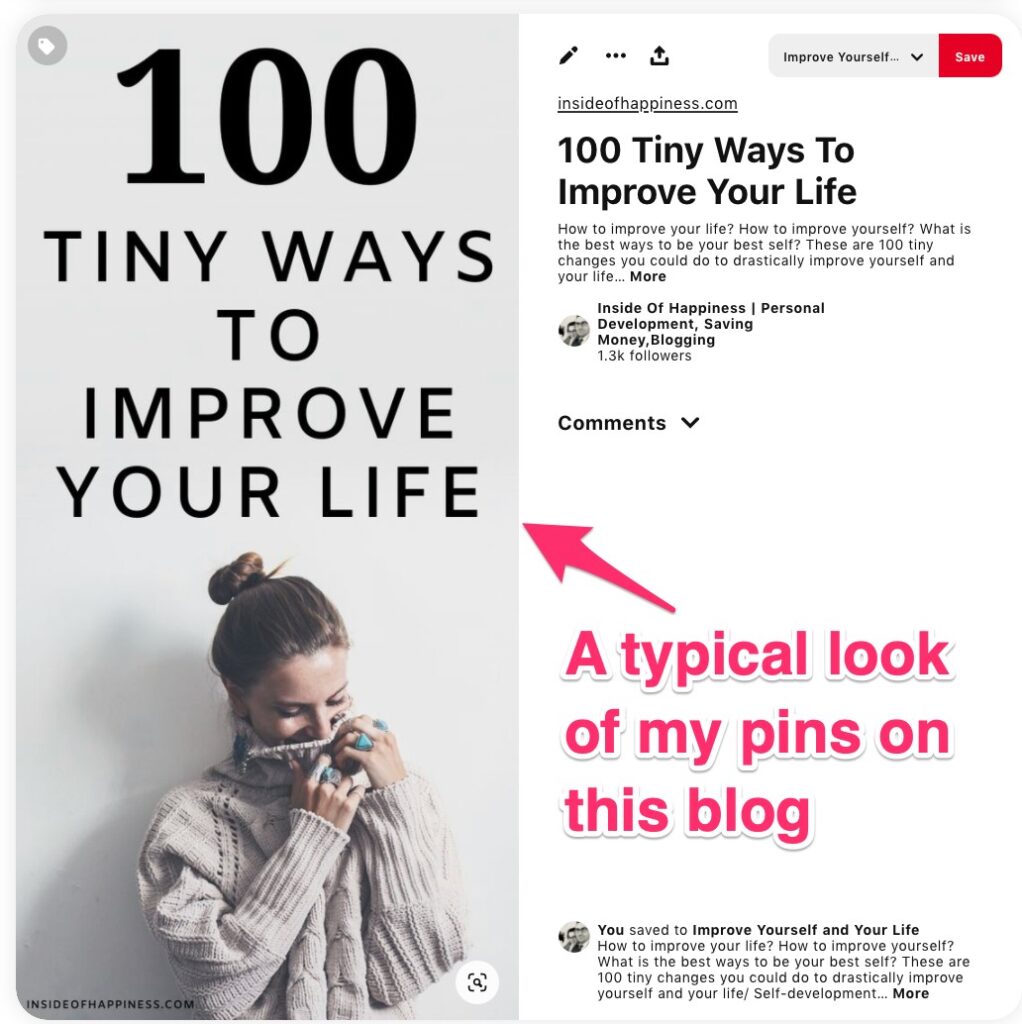
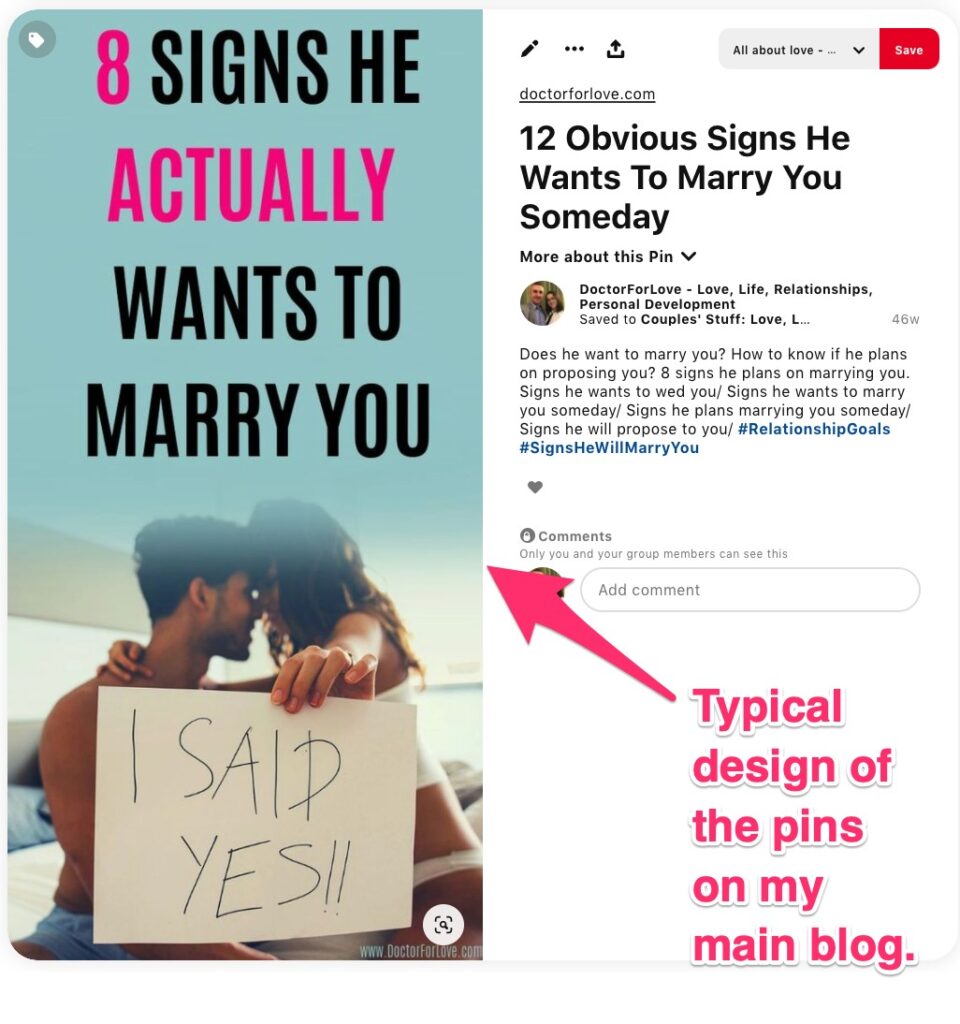
By “your brand look” I mean that Pinterest wants to see you using consistency with the design of your pins. I’ve got a few bloggers that I’ve advised on how to gain more traffic on Pinterest, and they’re all new. I always say that if you’re just starting with Pinterest, you want to experiment with the design of your pins.
The moment you see that a certain “look” or “a vibe” from your pins makes them perform better, you stick to that thing (look, vibe, whatever).
On both of my blogs, the pins look different, and each one of the profiles has different feeling coming from the pins. I try to experiment more with the designs, but at the same time, I keep the overall look as it makes it easily recognizable to Pinterest and my followers.
To get a clearer perspective, see below two screenshots from both profiles:
4. Poor design of your pins
Okay, this might sound harsh, but I must tell you – just because you like your pins, it doesn’t mean other people like them too.
It took me a while to understand and accept this, but it’s the only thing that could explain why you’ve done everything from the list above, but still don’t get any decent traffic (that and the fact that you might be too new on Pinterest).
Sometimes the pins we think are gorgeous just don’t push other people’s buttons. And you need to push their buttons.
Your pin must bring them emotions, no matter what. It must either excite them, inspire them, make them curious, awe them, make them doubt, or even upset them (not nice, but that’s what marketing is). Whatever it is, only emotion will make them click on your pin.
You want your pins to be:
- the right size – I talked about this in my Pinterest strategy 2020 post
- the image must be clear, high quality
- preferable not from the free-stock images everyone uses lately (although some of my best pins ever are with such images, that’s another theory I’ve got that isn’t the time to share right now)
- clean text, easy to understand and big enough to see on a mobile screen
- image and text must complement each other – meaning and colours
I use Canva to create my pins. Try it here, it’s free to use.

5. Unclear message from your pins
Okay, I know I just mentioned that one, but I need to dig deeper in it.
The images you use must be a visual expression of the emotion you want to tap into when people see your pin.
And on top of that, the image should fit the text on the pin. I cannot use a photo of a cute happy couple if I talk about getting over a breakup, can I?
A cute photo of a couple is the last you’d want to look at if you’ve cried over the previous two weeks over some guy (who doesn’t even deserve you, but that’s another topic).
6. You cover too many topics
In fact, that’s something I learned with this blog. Here I cover self-development, money tips, and blogging (I started promoting that one just recently).
However, in the beginning, I tried to create pins regarding both money and self-development topics, and things didn’t work well.
As I realized, Pinterest was confused about what my main topics are.
So, I dropped the money category and focused for a few months on self-development only. And my traffic boomed in a matter of weeks. Pinterest understood my target audience and is now showing my pins to more and more people.
Only after I had established myself in the self-development part, I started slowly introducing the money pins as well. In this way, things went smoother than I would imagine.
So, how many topics are you trying to cover? This might be the reason Pinterest doesn’t love you yet; they just don’t know who your target audience is.
7. Doing spammy stuff
I hope you’re aware that no matter what you do if you try to trick the system, you won’t be able to do it. It might work for a bit, but once you’re caught, that’s it.
However, sometimes some things look okay but are considered as spam on Pinterest.
Here’s the list:
Saving spammy pins
That’s a huge one by the way as you might not even know you do it. If you save other people’s content, you want to check that the link goes to a quality website. I’ve got a few things I do every time:
- I usually save only from bloggers I know have good quality content and blogs;
- I never save a pin if I don’t see it’s branded (as branded I mean that they’ve got their logo on the pin or at least their blog’s name);
- Even in this case, I always check the URL of the pin – it might be a stolen pin that goes to a spammy site, and I don’t want to save that type of content.
- I check if I’ve saved it before – I don’t save twice the same pin. Pinterest gives you a red warning if you already have that pin saved.
Saving too many pins at once
Years ago, that was okay-ish. Now it’s wrong.
I save only up to 10 pins at a time, often even less. (other people’s pins).
As of the last few months, Pinterest literally said that they prioritize only new content and advise to restrict ourselves from re-pinning old pins, no matter if they’re ours or others’ pins.
Following and following people
It doesn’t matter how many followers you have. I was stuck with the same 50K sessions for over a year while my followers were growing from 2000 to 20K. The number of followers doesn’t mean you get tons of traffic.
With that said, following and unfollowing people isn’t going to make you popular and it won’t bring you any additional traffic. The only thing you’re going to gain is the probability to be flagged as a spammy account.
On this blog, I gained over a thousand followers in three months without doing anything else but putting out quality content. That’s the only legit way to get followers.
I follow only people I would like to follow, they are all in my niche, and I follow them so I could see their content and re-pin if I want. So, if I follow you, that means I like you!
Being overly active and then disappearing
Another brilliant way to get flagged as spam is if you overdo it for a week and then go on a holiday for two weeks and don’t even log into your Pinterest account.
Neither of these is fine, and it won’t bring you traffic any time soon.
Repetitive pinning
Saving the same pins over and over again is repetitive pinning no matter if these pins are yours or not. Avoid that.

8. Lack of consistency
I mentioned it for a few times already… actually, now I realize that I’ve discussed almost everything more than twice. Well, that’s because things on Pinterest are intertwined, and you must be aware of what you do at any point.
Pinterest, just like Google, just like Instagram, and Twitter, and Facebook.. and any other social media, like consistency.
They are selfish and want your attention, and they want it every day of your life. That’s the trick with getting addicted to each one of them.
However, when you’re trying to build a business, to get traffic to your blog and establish yourself as a brand, you want to be there every single day. No exceptions. If you didn’t know it yet, blogging is more work than you’ve ever done before. And that’s what makes it so awesome (to me at least).
Pinterest traffic comes after you’ve been on the platform every single day for a while. Pinning, re-pinning, tweaking boards, being active is all that they want (and quality content, of course).

9. You are still new on Pinterest
If your account is under a year old, it’s considered as new. It’s my theory, don’t quote me on it.
And new accounts might struggle a little bit more than the older ones.
You just need to give it time, be consistent, find your people, produce quality content and know that if you do all that, Pinterest will appreciate you.
Disclaimer: I must mention that you need to be sure your niche is suitable for Pinterest. If your audience doesn’t stick on Pinterest for too long, then you might always struggle with Pinterest traffic. Probably your best place is Google or another social platform.
10. Expecting wonders right now
I love this one!
Yes, wonders happen.
One day you wake up, and your traffic is with 10K more than the day before… and it stays there for the next six months. That’s exactly what happened with me last year. Here’s where I talk more about it.
But that was a product of a lot of work that piled up for a long time before that wonder happened.
The truth is that Pinterest traffic isn’t easy to get. It’s frustrating, and I’ve had moments when I honestly hated the platform.
But it’s my place to be, and it’s an opportunity I don’t want to skip. I help people through Pinterest, and that’s important enough to swallow my pride and ego and get back to work.
What about you?
More posts to help you get that Pinterest traffic going


⇓Liked this post? Please, share⇓
No Pinterest Traffic? 10 Reasons and How To Fix Them

Blogger, dreamer, procrastinator, and lover of everything soul-touching. My mission is to make you laugh, provoke your thoughts, light up your day and inspire you to fall in love with life and yourself.









I love these tips, thank you. Although I am reading this at the end of 2021 where lots of things have changed on Pinterest, I believe the baseline of what you’re saying remains: focusing on using the right keywords and creating good content consistently.
Thank you, Kristin!
A solid article, you highlighted many good points!
I’m happy it helped you!