Can you relate?
It’s a sunny Saturday morning, and you are pumped to hustle on your blog by writing the best and the longest blog post so far. You understand that long-form content is essential for SEO, building authority, and keeping people on your blog (which translates into more ad revenue).
Yet, there is a tiny little problem you cannot solve … How to write long blog posts that are captivating and don’t leave you feeling like you need a month of holiday afterward.
And although the idea of a month-long break from everything and everyone sounds awesome, first you need to make that extra cash. For that to happen… you must write long blog posts that will convert the traffic into customers (or bring that precious ad revenue, as I already mentioned).
The longest blog post I’ve ever written was roughly 9 000 words (I broke it into smaller blog posts later on), and the longest one on this blog is exactly 6 843 words (the one where I list 110 things you could do with a journal).
Now… besides the obvious 110 reasons to have 110 subheadings on that blog post (yes, it ranks on the first page of Google, if you care to know), I’ve got plenty of other blog posts reaching over 3 500 and 4 000 words. The majority of my blog posts are over 2 500 words… How do I do it?
The idea of showing off with the word count I constantly chase is to tell you that writing longer blog posts isn’t just a myth, but a possible task you could get done in on sitting on Saturday morning.
However, let me first tell you…
What should you expect from this post?
Questions you will find fully answered in this post:
- Why are blog posts so long and why you want to write long-form content as well?
- Why you shouldn’t be woried if some people don’t read your lengthy articles or complain about it?
- How to make a blog post as long as you wish it to be (almost regardless the topic)?
- How to make a blog post LOOK LONGER even if it’s not that long (I will explain why you want that)?
- How to make your blog posts engaging?
- Tools you might need to make your content longer and better!
- I will also give you a detailed explanation of the process I usually go through while planning a long-form content.
Disclosure: This post contains affiliate links, which means that if you sign up or make a purchase I might get a small commission at no extra cost to you. Thank you for supporting my business. See full disclosure.
Why Are Blog Posts So Long

If you ask most beginner bloggers why are their blog posts long, they will tell you that it is for SEO purposes. And they aren’t wrong.
Every blogger, sooner or later, starts chasing the Google traffic and praying to the Google Gods for an increase in click-throughs. And once we realize that praying doesn’t help, short research tells us that Google loves long-form content.
But why? Why is it so important to Google if your blog posts are 2 500 words long instead of 1 000? Let me tell you a story, and I bet you will relate to it.
Why Google Wants You To Write More
At the beginning of my blogging career (over five years ago), I would sit on my desk, pick a topic I cared about and write as much as I believed was enough to cover the topic. My posts were roughly up to 800 words, and I thought I rocked it!
Needless to say, that didn’t get me too far, and after half a year of writing and getting zero results, I finally decided to start educating myself on what makes a blog successful and how to improve my writing skills. (I know, most people start with the research, I go with failure first).
I quickly discovered that I was drawn to reading long articles that would dig deeper into the subjects I was interested in (which was blogging). I would love it when I saw answers to questions I didn’t even know I had, and I would take notes and “star” pages that I believed were full of gems on the blogging topic.
But there is more…
You see, long-form content is great for SEO; after all, that’s how people will discover you. However, longer posts always (and I mean ALWAYS) will give more in-depth information, presented in a none-rushed way that is easily understandable and engaging.
When I see a blog post that is roughly about 1000 words, I end up disappointed because while reading, I get the feeling it could’ve been expanded at least a little bit more. Short blog posts (to me, 1 000 words sounds short) can rarely describe and solve a situation or a problem.
Why You Shouldn’t Be Worried People Will Get Bored By Your Long Posts

The thing is…
People are already used to getting more and more (and more) out of the web regardless of the topic. And my job (as well as yours) is to deliver to their expectations… NO! It is to exceed their expectations.
A reader should leave your blog with more ideas than he came with. He should be involved, engaged, and slightly overwhelmed by what he just read.
People won’t get bored by your content if it’s engaging, relates to their situation, and offers a point of view that matches or challenges their point of view.
And if they still do… that’s okay. Not all of my posts are everyone’s cup of tea, and I am okay with that. Just like in a normal conversation with a group of your friends – you are okay with having different opinions and differing in how you express them.
How Long Should a Blog Post Be?
A blog post should be as long as it takes to cover the subject and actually help the reader. The length would also depend on the topic and the purpose of the post. If a post’s goal is to guide and educate, it would be longer, usually over 3 000 words. However, if its purpose is to show or list something, it could be shorter in the range of 1 500-3 000 words.
Let’s dig into more numbers.
- 1000 words – This would be the minimum of words you should go for in a blog post. In 99% of the cases any topic would require at least 1 000 worrds to take a brief dive into understanding it.
- 1 000 – 1 500 words – This is the number that most bloggers go for in 2021 (according to a Survey Orbitmedia did this year). Most bloggers state that they get good results with a content of average 1416 words.
- 1 500 – 2 000 words – blog posts of this length require more serious work and deliver even better results.
- However, according to HubSpot data research the optimal length of most blog posts that rank on the first page of Google is somewhere between 2 100 – 2 400 words. I can confirm that because I already mentioned that over 95% of the posts on this blog are over 2 000 words.
What Makes a Good Blog Post?

Before I tell you of all the different ways I keep my content long, you must know that just cranking out long posts isn’t enough. You want your readers to be engaged and in love with what you write. Here are some of the tips I follow for writing great blog posts:
- Relating to the reader’s problem – always important part of the process.
- Relating to their mood – I’ve discovered that if I match the tone of the content to the mood of the reader it makes it way more engaging and increases quality.
- Keeping them active while reading – That happens through quesitons, photos, infographics and more.
- Showing different sides of the same coin – No problem has one side only. Offering a glimpse of different points of view (even if I don’t expand on it) serves like an extra spice to the meal.
- Well-written, minimizing the Grammar issues – I am not a native English speaker so I do my best with this one through using different tools, but it also comes with practice and attention to the details.
- Giving them answers, but also sparking even more quesitons – This has proven to be extremely helpful, especialy if the idea of the post is to invite the reader to click through and read another piece of content (or sign up for a freebie).
- Facts, data and research – they give you authority and make people trust you more.
- Personality – if there is one thing that truly puts me off that would be a content that looks like it’s written by emotionless machine (even when I know it’s not). Enterteinment isn’t always appropriate, but expressing human emotions regardless the topic is always welcome.
- Allowing people to follow your thought process – Too many blog posts out there are just like having a dry cookie while walking through the desert… they choke you with plain facts and ideas that bring zero excitement. Allowing people to follow your thought process (why you think the way you do, why they should consider this or that) is the milk in the described situation – it just makes them hungry for more.
How to Make a Blog Post as Long as You Wish (Regardless the Topic)

Well, I obviously mean almost regardless of the topic. Remember, there are always exceptions to the rules, but here are all of my tricks!
I follow the ideas below in some of my blog posts as not all tips will fit every article. However, if a blog post turns up to be unacceptably short, I’d do a few of the following things.
So, let’s say you just finished a blog post, and it’s in the “disappointing” range of 990-998 words, but you are out of ideas on how to make it longer than that. Here’s what you could do!
Proper research of the topic
Before writing this post, I spend almost two hours researching the topic. The truth is, yesterday, I got asked twice how to write longer posts, so I took it as a sign to write a complete piece of content as an answer.
Today, I sat in front of the computer at 7-ish a.m. and started writing at 9-ish a.m. That would make for up to two hours of research.
However, not every blog post requires that much research, and if you already have all of the data piled up, writing will be easier and faster.
By including or quoting research, you always have the possibility to expand this into a separate subheading or at least add a paragraph to your post. That squeezes in roughly 100-200 words extra.
Add a story

This is one of my favorite ways to expand a blog post. If you were to write a blog post on a topic, you have likely been in a situation that relates one way or another to that topic. Not sure? Dig deeper; you might remember a story your friend told you last year about that girl who… you get the point.
Sharing an engaging story doesn’t just add another 300-500 words to your blog post, but it helps readers picture things in their minds, keeps them hooked, and connects them with you. Why not even leaving the story with an open end that you “close” toward the end of the post?
Why not even making fun of yourself in that story, showing sarcasm – alternatively, showing compassion and empathy (it all depends on the story, of course).
Use bucket brigades
Bucket brigades are engaging words or phrases skilled copywriters use effectively to keep people glued to the papers (or the screens) and get them to read the next paragraph (and then the next one).
If you aren’t using them in your blog posts, now would be the time to start.
Here are a few examples of bucket brigades I have used in this post so far: Can you relate?; However, let me first tell you…; The thing is…; But there is more…
These words and phrases aren’t here to add volume to the blog post (even though they could add up to 50 words more) but for keeping visitors on the page eager to read the next sentence to find out what’s “the thing” or “what’s more” that you keep mentioning.
Add an affiliate product
If you push yourself a little more during the research session, you will most likely find an affiliate product to promote throughout the blog post. This could be a physical item, a course, or a service that will take the leader to the next level of expertise.
Having an affiliate product could easily be a reason to add a full subheading with two to three paragraphs that describe the benefits of getting it.
Now you have another 200-300 words more to your blog post.
Add your own product
… Like you didn’t think of that…! (#sarcasm)
At the same time, I keep forgetting to add my own products to the blog posts and realize that when I read someone else’s post about bogging tips that it’s good to have my products advertised in every piece of content I have.
In the “tools” section below, I will share the two easy-peasy ways to add your products to any piece of content without having to write long paragraphs of introduction every time (yes, both are free).
Just by doing this, you add another 150-200 words to your blog post. Did you count how long your post would be by now if you’d done these five things I mentioned so far? I’ll save you the time and tell you: anywhere between 800 – 1250 words (I’m not joking here!)
Answer questions / Have Q&A section
Did you notice that most of the subheadings at the beginning of this post are actually questions? That’s one of the tricks to add more value to the blog post. By answering questions, people might have on the topic you write about; you automatically build authority because it looks like you know the ins and outs of the matter.
Example: Let’s say you have to write a blog post about how to cook rice. How long could a blog post on cooking rice be? 200-300 words with the emojis in it? No! 3465 words! One of the results on Google’s first page has everything you might need to know about rice regardless of what you’d like to do with it (accept planting it, of course). The blogger has formulated the subheadings as questions one might have regarding cooking rice (on the stove, in the oven, microwave, how long, dos and don’t, and so on). Sprinkled with some photos to break the content, you can hardly realize the post is that long.
Another great way to format this is by having a Q&A section in the post.
Example: Let’s say you have a niche blog, and you always get asked the same questions again and again. Having a Q&A page is a great idea, for sure. But grabbing a few of the questions and adding them in a separate Q&A subheading could easily add extra 500 words to your blog post. This also gives more value to your content, and you could use the opportunity to advertise an affiliate (or your own) product or redirect to another piece of content.
Add examples
Did you see that one happening in the previous tip (regarding the “how to cook rice” post)? I gave you a clear example supporting my idea that answering questions could make your posts a lot lengthier than they initially are.
It was a nice break that kept you engaged and curious, right? (please, nod here)
Examples do that. They make things more visual and help prove a point – that writing over 3000 words on a topic that you and I could write not more than ten sentences is possible if done right.
That simple example above added extra 100 words to this post, so well done to me!
How to Make a Post LOOK LONGER Even If It’s Not?

Okay, let’s say that none of the tips above (or most of them) applied to your situation with the 998-word article. How do you make it look longer than it is?
Why do you need it to look longer than it is?
The answer is extremely simple: ads!
Longer content allows more ads on the page, which automatically translates into dollar signs into your account. Another reason is that the longer people stay on your posts, the more valuable, engaging, and authoritative your content will look in Google’s eyes.
However, if your text is short, you could still make the most out of it by following the steps below.
Break the paragraphs
Probably a no-brainer, but breaking longer texts into smaller bite-size paragraphs could easily double add space and make the content appear longer. Plus, two three sentences per paragraph are easier to read than long 10+ sentences chunks of text. Most people will just skip through vast blocks of text, like this one, because it would seem almost impossible to follow the thought. Maybe it has something to do with those days back at school, when we were obligated to reading boring history facts over and over again (and then repeating that content when asked to do so). Well, maybe your eyes are already tired of reading this, which proves my point that if I had broken this paragraph into a few, things would’ve been way simpler than they look now. If you are still reading this, the rule I go for is two or three sentences per paragraph.
Add data/research

I understand I mentioned this one already, but you could use the same data and research information differently by adding tables and systemizing it in a different format.
The data I gave you at the beginning of the post was in the form of bullet points, but it could quickly be done as a table, right?
This tip is especially good to follow when writing on a bit more technical or “dry” topics that tend to sound monotonous. Breaking the pieces of facts into more attractive ways would fix that and make things more visual.
Add Infographic
A long shareable infographic could do wonders for your post and would make it longer as well. I rarely do those, but that’s simply because I’m lazy. Infographics help people systemize the same information visually and memorably. Everyone loves them, so make the most out of them.
Add quotes
“Good quotes help to tell a story and enhance the credibility of a press release, news story, or speech. Words that are crafted well can leave a lasting impact on the world.“
Holly Zuluaga
I doubt there is such thing as a blog post that wouldn’t benefit from a few quotes here and there.
Imagine having ten subheadings and attaching a quote on five of them… this not only adds extra 100-150 words to your overall text but makes the post look longer and creates ten more opportunities for ad space.
Create lists of everything
Lists are a great way to break the content and make it easier to read (something similar happens when you break the big blocks of text).
You could create any lists:
- ideas-list on the topic you write about
- list with all of the subheadings (yes, that’s called Table of Content)
- products-list that solve entirely or partially the problem
- how-to lists
- checklists (although I would advise to offer that one as a freebie and use it for building your email list)
- or a list of lists you could have (which is what you see just here)
Add photos

Another no-brainer, yet I keep seeing blog posts with almost no photos. Photos aren’t just for a visual representation of the text (which would be the case of how-to posts).
They could also serve as a break for the eye when the text is long or as an inspiration and aesthetically pleasing effect.
You could also combine this idea with the quotes and create even better formatting of the post, as I’ve done in this post here.
Add video
Having videos in your blog posts isn’t beneficial for SEO only, although that’s a good enough reason to add a video to each of your articles.
However, a video would break the text and make it appear more enriching for the reader.
Imagine having a post where you add an infographic, inspiring quote, a few lists, and a video besides the text. You will already be ahead of most of the other bloggers out there.
Useful Tools To Make Your Content Even Better
Most of the tools I list below are for free, so you really can’t excuse yourself from making an effort to improve your blog posts. Let’s see what I use daily for better writing.
Grammarly
This isn’t from the free ones (although they offer a free version also). This post is already over 3 500 words long; reading and editing it is as painful as you can imagine. I need Grammarly for my blogging as much as I need air for staying alive. It’s one of the best investments a blogger could make every year.
Create Cards by Mediavine Plugin
This plugin is free, and it is also a life-saver when it comes to improving the quality of the content.
Remember where I said that you could add your own products with one click only? Well, you’ll need to do a few more, but the writing happens once.
This plugin allows you to create cards with a different type of content (how-to, lists, recipes) and then inserting those as many times as you wish throughout the post.
Here are just a few of the ways I use it:
- Round-up posts – it pulls the featured photos of the posts I share (see an example here).
- Affiliate product lists – for Amazon and Etsy, it also pulls the featured photos through, so it’s less hustle to think of ways to promote their products.
- My own products – I have one of my products – a Happiness Journal, advertised on various places in most of my blog posts, and every time I just insert that Create Card I created months ago. Saves me time and nerves.
- Related posts – I will show you an example below (look for the related post on going through 30-day grow your blog challenge)

Gutenberg Reusable Blocks
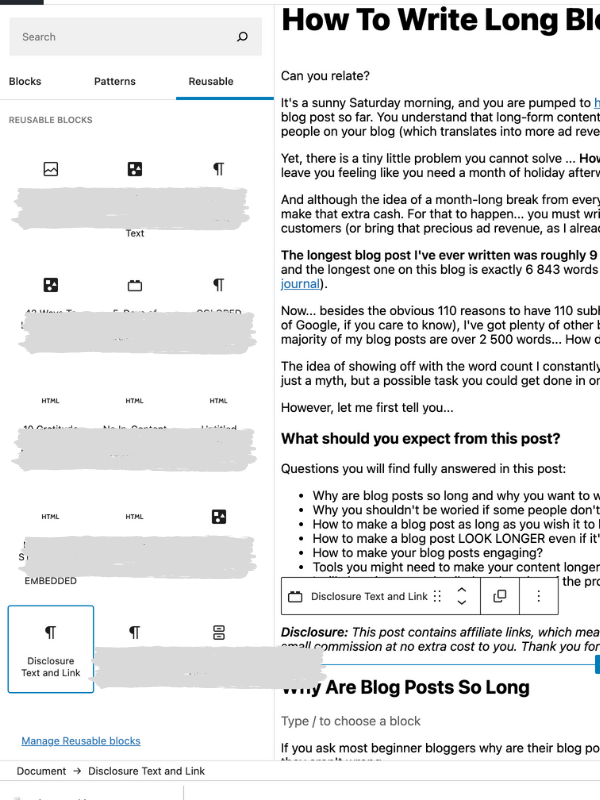
Another great way to save time and have the same information inserted in as many blog posts as you wish with no extra plugins – Gutenberg Reusable Blocks
I use this one for my Disclosure at the beginning of the post and for the CTA to download this blog post on your device for $10 only. (don’t worry, I’m adding it below for visual only)
Wordcount Google Chrome Extension
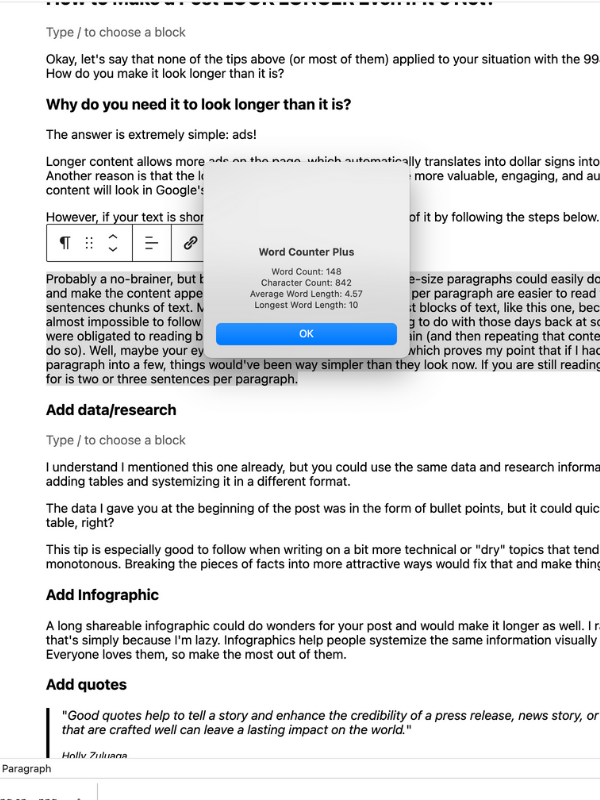
If you’ve read my post on top Google Chrome extensions every blogger could benefit from, you know that I mention Wordcount. I just used it to tell you how long the rice post was. It takes less than half a minute to highlight the text and right-click to see how long that highlighted text is.
Add it to your Google Chrome here.
Answer the Public
You might have heard of this one, or you might have not.
However, if you believe that creating Q&A sections is good, this site will help you find the most frequently asked questions for your keyword.
*Psst, I also use the People Also Ask section on the first page of Google.
Conclusion To This Long Post
This post is already well over 4000 words now, so I hope you saw enough value in it to get to this part here. And before I leave you to write your very lengthy Saturday post, let me just insert a disclaimer.
You want your blog posts to be as long as needed to cover the topic you write on, so if you fit into 1200 words and feel like adding more would diminish its value, just leave it as it is. Your content isn’t about chasing the numbers but about bringing value. All of the ideas I mentioned above should be used to bring more value to your writing, and if they don’t – leave them out of it.
Don’t forget to get your copy of this post PLUS a checklist with the ideas by clicking this link here.
Save this post for later

How To Write Long Blog Posts (And Why You Should)

Blogger, dreamer, procrastinator, and lover of everything soul-touching. My mission is to make you laugh, provoke your thoughts, light up your day and inspire you to fall in love with life and yourself.